The Internet presents as the perfect platform to access and share information. But information dissemination comes with potential risks.
 Masking Your Computer’s IP Address for Enhanced Online Security
An IP address is a unique numerical identifier assigned to every device connected to the internet. It allows devices to communicate with each other and helps ensure that data is routed correctly. There are several ways to hide an IP address. One common method is to use a proxy server, which is a computer using a proxy server that acts as an intermediary between the user and the internet.
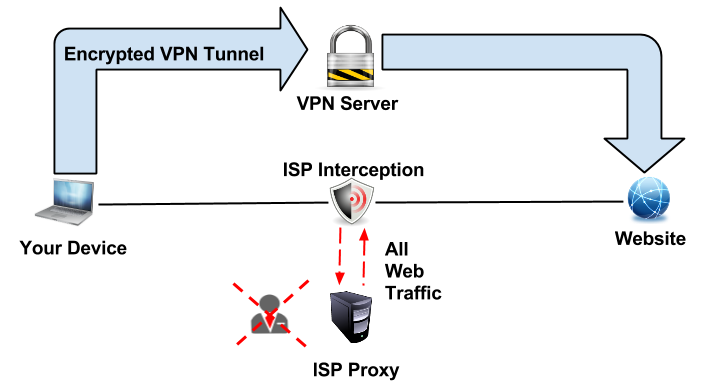
The user’s traffic is routed through the proxy server, which hides the user’s real IP address. Another method is to use a virtual private network (VPN), which encrypts all of the user’s traffic and routes it through a VPN server. This makes it much more difficult for someone to track down the user’s real IP address.
Why Should You Hide Your IP Address?
There are several reasons why people might want to use programs to hide their IP addresses. One reason is to protect their privacy online. They can prevent others from seeing their online activity or finding their real location by hiding their IP address. Another reason people might use programs to hide their IP addresses is to bypass geo-restrictions.
For example, if someone is trying to access a website only available in certain countries, they can use a program to spoof their location and make it appear as if they are in the allowed country. This can be used to access content that would otherwise be unavailable.
Finally, some people use programs to hide their IP addresses to commit crimes online. By concealing their identity, they can make it more difficult for law enforcement to track them down and bring them to justice.
What Type of Information Can Your IP Address Provide to Cybercriminals?
Your IP address can provide cybercriminals with a lot of information about you. They can use it to find out your approximate location, learn what type of device you are using, and see what internet service provider (ISP) you are using. Additionally, they can use it to launch attacks against you or your device.
Cookies can give important identifiable information away. Cookies are small pieces of data that are stored on your computer when you visit websites. They can contain information such as your login credentials, browsing history, and other personal information. If a cybercriminal gets access to your cookies, they may be able to learn more about you and steal your identity.\
There are many ways that cybercriminals can steal information from your account. They may use phishing emails to trick you into clicking on a malicious link or attachment. They may also use malware to infect your computer and gain access to your accounts. Cybercriminals may also buy or sell login credentials on the dark web.
Effective Ways to Protect Your Identity Online
There are several things you can do to protect yourself online. One is to use a proxy server or VPN to hide your real IP address. A VPN is a Virtual Private Network. It is a way to create a secure, private connection between two devices over the internet. VPNs are often used by businesses to allow employees to securely connect to the company network from outside of the office.
However, they can also be used by individuals to protect their privacy online and bypass geo-restrictions. There are several problems with VPN providers. One is that they can be slow, as your traffic has to travel further to reach the VPN server. Additionally, some VPN providers keep logs of user activity, which defeats the purpose of using a VPN in the first place. Plus, some countries block access to VPNs or make it illegal to use them.
The best VPN for Android devices depends entirely on user preferences. Not every VPN provider is created equal, so it’s important to conduct the necessary research ahead of time. You should make sure that your devices and software are up-to-date and that you have strong passwords for all of your accounts. Finally, you should be careful about the websites you visit and the links you click on.