 Instagram has become a pivotal marketing platform for a reason. It has introduced plenty of exciting features, and Instagram stories are one of them. More than 500 million users on Instagram use this feature to boost their engagement and reach. If you’re looking for an effective way to promote your brand, share your thoughts, or simply want to upload a fun story to share with your friends, now is a perfect time!
But uploading plain texts and simple pictures will depict a boring representation of your innovative thoughts. In 2021, the type of posts that boast the greatest chances to go viral videos that stimulate as many senses as possible. Now, if becoming viral is your endgame on Instagram, why not add a music touch to your Instagram stories? Here’s how to add music to your IG story.
Note: Want to boost your engagement and reach? Click here to buy Instagram likes $1 and buy Instagram followers for $1! It’s one of the fastest ways to increase likes and followers on Instagram!
A quick reminder: Instagram stories are the small icons that appear at the top bar on your Instagram’s homepage (arranged in chronological order from the newest to the oldest). You’ll recognize a story update of any profile you follow by the colorful ring surrounding its corners.

Once we’ve got this intro covered, now is the time to stop wishing and start having enchanting music Instagram stories reflecting your innovative thoughts completely.
For starters, you can add music to an Instagram story from the Instagram music library and compatible third-party platforms, such as Shazam and SoundCloud. Here are the simple steps you should follow to play some tune in your story:
Youtube video:
How To Add Music To Instagram Story (New Methods) | Add Music To Story
How To Add Music To Instagram Story? – Step By Step Guide:
Step 1: Open the App:
First, you need to download the official Instagram application on your mobile device and login into your account with your credentials. Once you log in to your account, you’ll be directed to Instagram’s homepage.
Step 2: Tap the Story Icon:
From Instagram’s homepage, tap on the story icon named “Your Story” in the top left corner. Once you click there, tap on the camera button to capture a photo, or you can choose one from the gallery.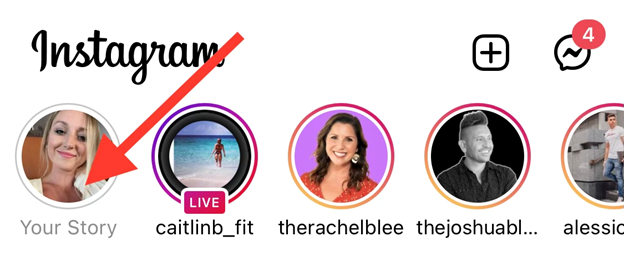
Step 3: Capture and Customize:
As mentioned in the previous step, you can capture photos and videos or upload existing ones from your gallery. Here you’ll find a “Customization bar” on the left with many options, including text, stickers, collage, and more. These will be especially useful to customize your story and possibly enhance its engagement and reach rates.
Note: We suggest you capture pictures and video from a perfect angle and use Instagram’s myriad editorial options to make your story look as attractive as it could.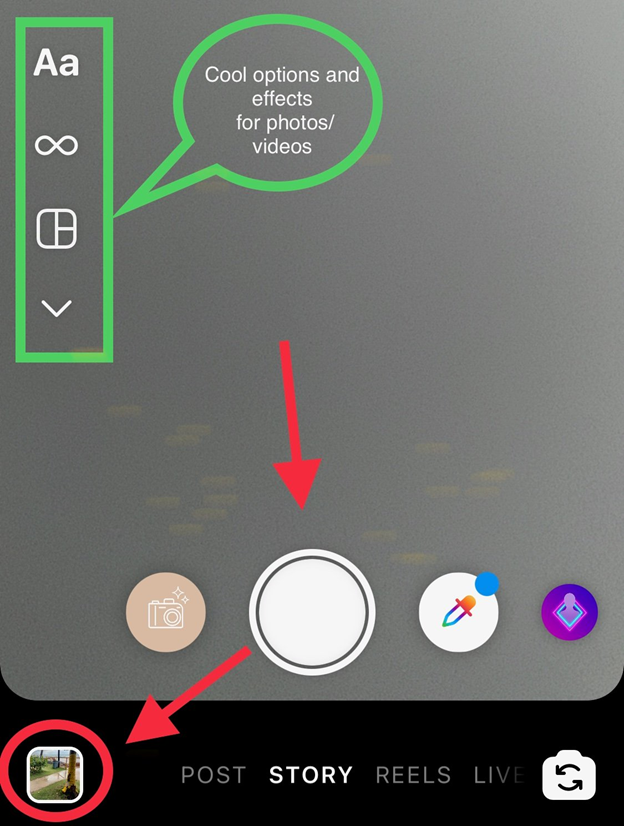
Step 4 (Android Users): Tap the Music Button:
Once you’re done capturing the photo or video for your Instagram story, tap on the “Music” button. Next, proceed with the “Sticker” option, which appears at the top of the story page. Then tap on the “Music” sticker from the list to add music to your Instagram story.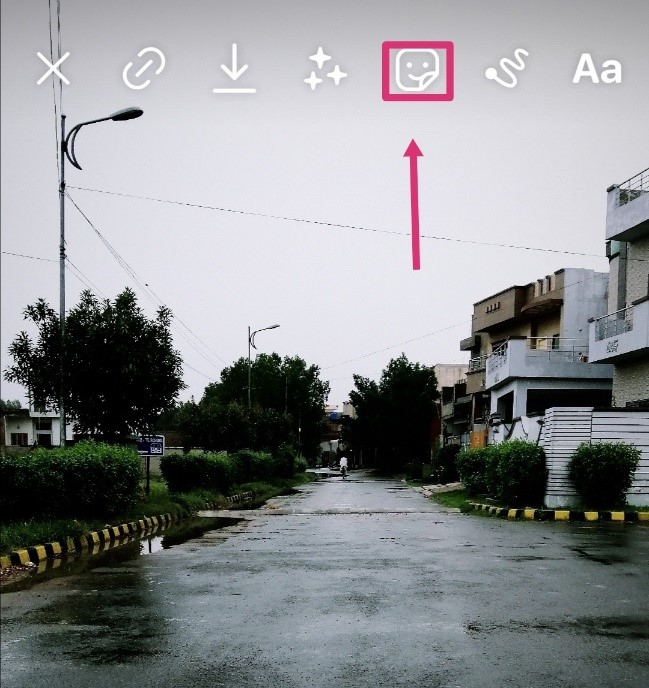

In iOS mobile phones, you’ll find the “Music” button directly from the top panel rather than going into the stickers option.
Step 5: Find the Soundtrack:
Hurray! Welcome to “Instagram’s Music Library,” which contains thousands of music clips and songs to choose from! You can use the “Search” option at the top to find the one that fits your story the most among the thousands of tracks and artists that are there.
Instagram’s Music Library
For You: This category contains music tracks and sound clips based on your region and recent searches.
Browse: If you want to explore other categories, choose Browse.
Once you’re done searching and finding the track you want to add to your Instagram story, you can fast-forward it and rewind it to choose the best part you’d love to add.
Note: The maximum duration for the clip will be 15 seconds if you choose an image as your Instagram story, and the track will play for 15 seconds. If you integrate some track in your video, the track will play as long as the video runs.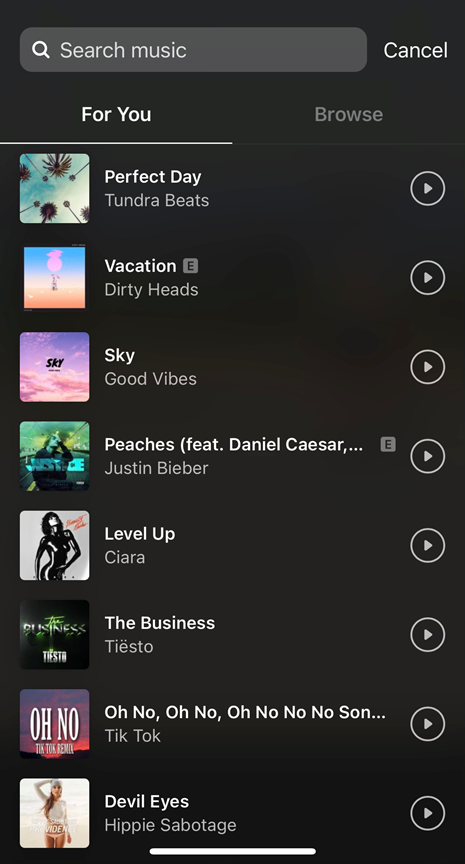
Step 6: Post Your Story:
Once you’re done adding the music to your Instagram story, it’s time to post! Click on the “Your Story” button at the bottom of the page, and you’re done.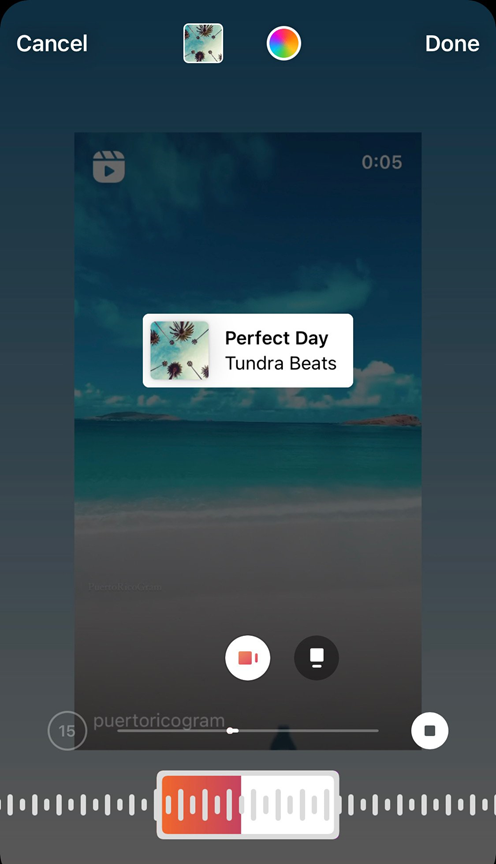
- Add music through Spotify – A Step-by-Step Guide:
Spotify is an excellent app with lots of music available to use. You can easily share music from Spotify on Instagram stories in a few simple steps. Here’s what you should do:
Step 1: Make a Spotify account
You can make a Spotify account through Facebook or with your email. Add necessary details and verify your account to access the app. Then, you can listen to music and add songs to your library for offline use.
Step 2: click on the share option
If you want to share music with your Instagram followers, all you have to do is click on the desired song and the ‘share’ option below it.
Step 3: click on Instagram
Now, simply choose Instagram.
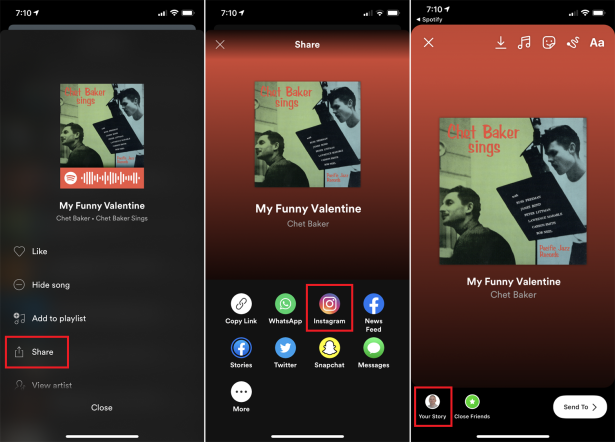
Step 4: Share stories
Select the story option (and add effects/captions if you feel like it). Then, when your friends or followers click on the music, it will take them to Spotify directly.
- How to add music through SoundCloud
SoundCloud is a perfect music app through which you can listen to your favorite music offline and online. If you want to share music from SoundCloud to your Instagram stories, it’s no biggie.
Step 1: Make an account on SoundCloud
To share music from SoundCloud on Instagram stories, you need to make an account. You can either sign in through your Facebook or register with your email instead.
Step 2: Search for the song
Now, you need to search for the song you want to share and listen to it once or add it to your playlist.
Step 3: Share on Instagram stories
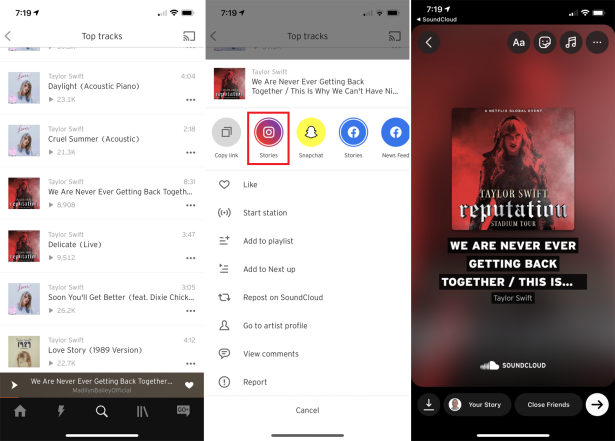
After opening the song, search for the share icon and select Instagram story’s icon.